Kubernetes 101, part V, statefulsets
In the previous article, we explored ways to handle pod updates without affecting availability, using Deployments.
This article will cover stateful applications in Kubernetes and how StatefulSets fit in such scenario. Moreover, you'll have the chance to understand how volumes work in Kubernetes and how they relate to Pods hence Deployments and StatefulSets.
Let's start the journey.
When working with containers, more precisely Pods, it's known that their data is ephemeral, which means all data written to the Pod will live during the Pod lifetime only.
Once the Pod is terminated, all its data is lost.
That's the essence of stateless applications.
🔵 Stateless applications are the default
By default, all applications in Kubernetes are stateless, meaning that data within the Pod are ephemeral and will be permanently lost during an application rollout update.
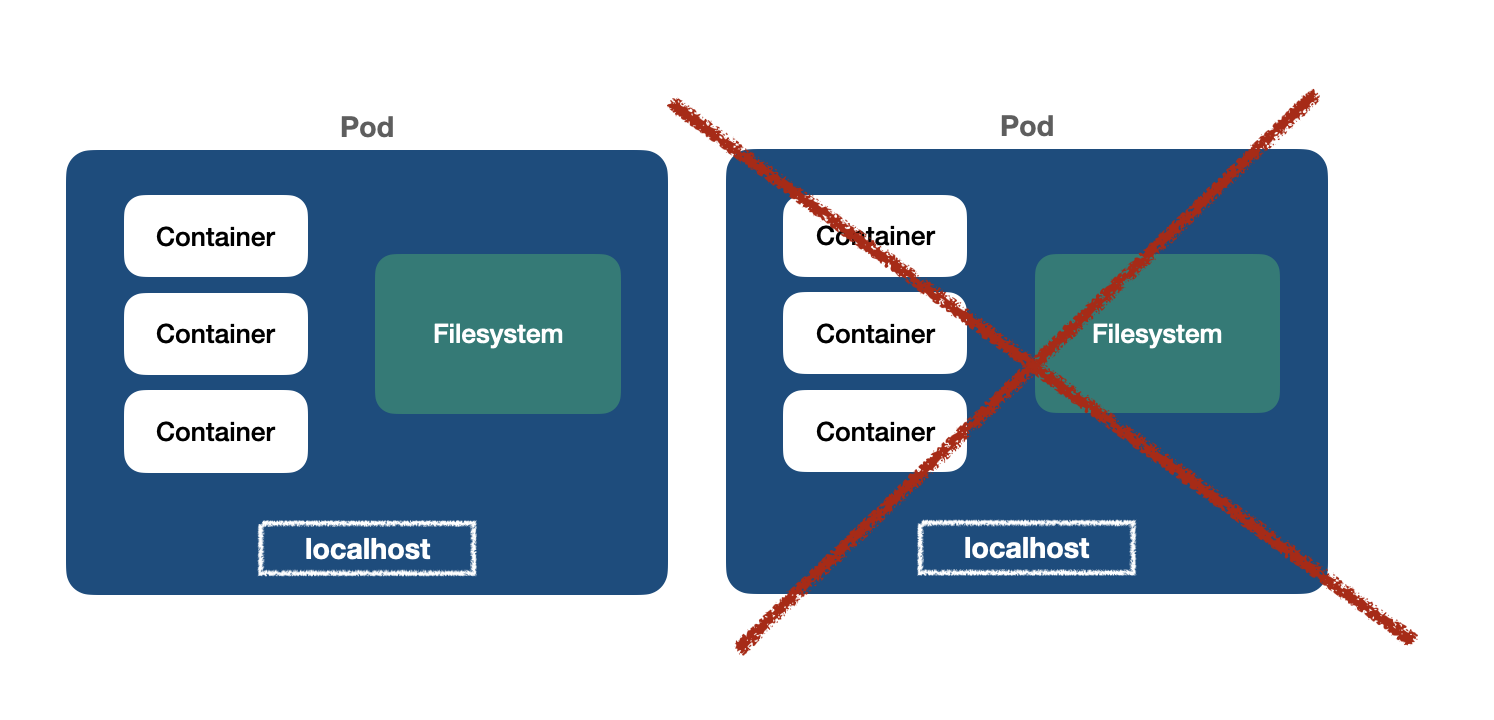
For instance, suppose we have a PostgreSQL Deployment:
apiVersion: apps/v1
kind: Deployment
metadata:
  name: pg
spec:
  replicas: 1
  selector:
    matchLabels:
      app: pg
  template:
    metadata:
      labels:
        app: pg
    spec:
      containers:
        - name: postgresql
          image: postgres:14
          env:
            - name: POSTGRES_USER
              value: postgres
            - name: POSTGRES_PASSWORD
              value: postgres
Once it's running, we can create a table called users in the database:
And running the query afterwards:
|
()
👉 Rolling out the application
Not rare, we have to update the application pod, either fixing some bug, updating the database version or doing some maintenance.
Notice the the pod name has changed, because it's a deployment, and Deployments have no ordering or identity for differentiation.
Let's perform the query on this new Pod:
;
Uh, oh...the table has gone away. Pods are stateless, remember?
🔵 Stateful applications
If we want to build a stateful application in Kubernetes, we have to share a common persistent structure that can be mounted across different pods of the same replicaset.
Enter Persistent Volumes.
👉 VolumeMounts and Volumes
In order to use persistent volumes, we have to mount a volume in the Pod container spec:
kind: Deployment
... # more
spec:
  template:
    spec:
      containers:
        - name: postgresql
          image: postgres:14
          env:
            - name: POSTGRES_USER
              value: postgres
            - name: POSTGRES_PASSWORD
              value: postgres
          volumeMounts:
            - name: pgdata
              mountPath: /var/lib/postgresql/data
Here, the volume is described as pgdata, which will be mounted to the path /var/lib/postgresql/data in the container. This path is exactly where the PostgreSQL data is located.
However, the volume pgdata can't come from nowhere. We need to request a persistent volume in the underlying infrastructure storage.
By infrastructure, we could think of our host machine in development, a server in the production environment or even a product storage by the underlying cloud-provider if that's the case.
In the template.spec section, we add the volumes section:
...
spec:
  template:
    spec:
      containers:
        ...
      volumes:
        - name: pgdata
          persistentVolumeClaim:
            claimName: my-pvc
👉 PersistentVolumeClaim
Persistent Volume Claim, or PVC, is a request by the user for some piece of storage. In the above example, we assume that we have a PVC called my-pvc, let's create it then:
apiVersion: v1
kind: PersistentVolumeClaim
metadata:
  name: my-pvc
spec:
  storageClassName: my-sc
  volumeName: my-pv
  accessModes:
    - ReadWriteOnce
  resources:
    requests:
      storage: 1Gi
The PVC requires some attributes:
storageClassName: it's a class of storage defined by the administrator of the cluster. Storage class holds traits about policies and other storage services of the cluster. We'll create it soon.
volumeName: the persistent volume, which is a piece of storage that can be statically of dynamically provisioned in the cluster
accessModes, resources among others...
👉 StorageClass
First, we have to create the storageClass:
kind: StorageClass
apiVersion: storage.k8s.io/v1
metadata:
  name: my-sc
provisioner: kubernetes.io/no-provisioner
parameters:
  type: local
Provisioner determines the plugin used to control the storage provisioning in the cluster.
In development, we can use the default kubernetes.io/no-provisioner, which will not request storage dynamically, so we have to declare the persistent volume manually.
👉 PersistentVolume
The Persistent Volume is a piece of storage in the underlying infrastructure.
By defining capacity, storageClass, accessMode and hostPath, we can declare such a piece ready to be used by a PVC in a Pod.
apiVersion: v1
kind: PersistentVolume
metadata:
  name: my-pv
spec:
  storageClassName: my-sc
  capacity:
    storage: 1Gi
  accessModes:
    - ReadWriteOnce
  hostPath:
    path: /data/volumes/my-pv
Once we applied SC, PV and PVC, we can apply the Deployment using the PVC my-pvc:
apiVersion: apps/v1
kind: Deployment
metadata:
  name: pg
spec:
  replicas: 1
  selector:
    matchLabels:
      app: pg
  template:
    metadata:
      labels:
        app: pg
    spec:
      containers:
        - name: postgresql
          image: postgres:14
          env:
            - name: POSTGRES_USER
              value: postgres
            - name: POSTGRES_PASSWORD
              value: postgres
          volumeMounts:
            - name: pgdata
              mountPath: /var/lib/postgresql/data
      volumes:
        - name: pgdata
          persistentVolumeClaim:
            claimName: my-pvc
And boom...
Now, time to check if the volumes are working properly across rollout updates:
### CREATE TABLE
### QUERY
### ROLLOUT
And then, performing the query against the new Pod:
|
()
Yay! We just created a stateful application using Deployment and Persistent Volumes!
🔵 Scaling up stateful applications
At this moment, our Deployment has 1 replica only, but if we want to achieve high availability, we have to configure our deployment to support more replicas.
Let's scale up to 3 replicas as we learned in the previous article. It's easy as doing:
Great, uh?
After several rollout updates, we may end up with the following state:
💥 Oh my...the application has gone away.💥
There's no healthy Pod left. The entire Deployment is broken. What happened here?
👉 Deployment replicas share the same PVC
All Pod replicas in the deployment are sharing the same PVC. Due to concurrency issues, when there are two Pods writing to the same location, it can lead to data loss or corruption.
After several rollouts, it's not rare that our deployment will end up in a broken state like above.
Moreover:
Deployments don't guarantee ordering during updates, which can lead to data inconsistency
Deployments don't provide any kind of identity, like a stable hostname or IP address for the Pods, which can cause reference issues
Hence, despite it's possible, Deployments are not a good fit for stateful applications.
Thankfully, Kubernetes addresses thoses problems by providing another workload object called StatefulSet.
🔵 StatefulSet
The StatefulSet object brings a StatefulSet Controller that acts like the Deployment Controller, but with some differences:
they have an identity, addressing reference issues
StatefulSets guarantee ordering of updates, thus avoiding data inconsistency
Pod replicas in a StatefulSet do not share the same PVC. Each replica has its own PVC
We'll follow the same process as for the Deployment, but referencing kind: StatefulSet instead:
apiVersion: apps/v1
kind: StatefulSet
metadata:
name: pg
spec:
replicas: 3
selector:
matchLabels:
app: pg
template:
metadata:
labels:
app: pg
spec:
containers:
- name: postgresql
image: postgres:14
env:
- name: POSTGRES_USER
value: postgres
- name: POSTGRES_PASSWORD
value: postgres
volumeMounts:
- name: pvc
mountPath: /var/lib/postgresql/data
volumeClaimTemplates:
- metadata:
name: pvc
spec:
accessModes:
storageClassName: "local-path"
resources:
requests:
storage: 1Gi
Note that the containers.volumeMounts keep the same, as it needs to reference the volume declared in the template.
But the persistent volume will be created dynamically using the attribute volumeClaimTemplates, where we just have to define the storageClassName and storage request.
Wait...why are we using local-path in the storageClassName?
👉 Dynamic Provisioning
In order to create persistent volumes dynamically, we can't use the storageClass we created previously, because it uses a provisioner called no-provisioner which does not allow to provision volumes dynamically.
Instead, we can use other storageClass. Chances are that you have a default storageClass created on your cluster.
In my example, I created the k8s cluster using colima, so it already has created a default storage class that allows dynamic provisioning.
Go check your cluster and choose the default storageClass created by it.
That's why local-path is the name of the default storageClass, which allows dynamic provisioning.
After applying the StatefulSet, we can check that we have 3 replicas running. This time, the name of the pods follow a ordering number:
Also, confirm that we have 3 different PVC's:
And lastly, that we provisioned dynamically 3 persistent volumes, one for each replica:
Such a big Yay! 🚀
Now, we can scale up, down or perform rollout updates as many times as we want, scaling issues with stateful apps are gone!
🚀 Wrapping Up
Today we learned how to build stateful applications in Kubernetes using persistent volumes and how Deployments can lead to issues while scaling stateful applications.
We've seen how StatefulSets are the best solution for this problem, by keeping identity and ordering during updates, avoiding data inconsistency.
Stay tuned, as the upcoming posts well continue to cover more workload resources in Kubernetes, such as DaemonSets, Jobs and CronJobs.
Cheers!