Arrays in x86 Assembly
Originally posted in Portuguese
Recently I wrote a 6-article series about x86 Assembly (written in Portuguese, but I'm planning to translate the guide to English soon), covering fundamental concepts of computer architecture and low-level programming while building a minimalist multi-threaded web server.
During the process, I left some important concepts aside for later articles, because if I had tackled them during the series, it would have been even longer than it already was. However, these are concepts that can be addressed separately, like the queues implemented in the thread pool.
And when we talk about queues, it's inevitable to address arrays and how they're organized in computer memory.
In this article, we'll cover fundamental concepts like memory manipulation, registers, and heap memory while implementing arrays.
I'm assuming you're already familiar with x86 Assembly and the GDB tool. If not, I strongly recommend reading my series.
Agenda
Arrays don't exist
Arrays don't exist. Simple as that.
As we saw in part IV of the series, memory is organized contiguously, where information is allocated one after another.

Suppose we want to declare the following sequence of information:
1, 2, 'H', 0
I know, I know, the types are mixed, but that doesn't matter right now. They all fit in 1 byte
In x86 assembly (let's call it asm for the rest of the article), we can declare this information in the data section like this:
section .data
stuff: db 0x1, 0x2, 0x48, 0x0
Remember that the character 'H' in the ASCII table represents 0x48 in hexadecimal
Using gdb for debugging, we can confirm that this hexadecimal sequence at the stuff label is stored as follows:
# Reading the first hexbyte in stuff
() &
# Reading the second hexbyte in stuff
() &
# Reading the third hexbyte in stuff
() &
We can also represent the hexadecimal 0x48 in string format using x/s:
() &
It's all hexadecimal!
With this, if we want to represent the string "Hello", according to the ASCII table, it could look like this:
section .data
msg: db 0x48, 0x65, 0x6C, 0x6C, 0x6F, 0x0
In gdb, let's check the string representation of the msg label:
() &
In asm, it's possible to declare the string with direct ASCII table representation:
section .data
msg: db "Hello", 0x0

; same as
; msg: db 0x48, 0x65, 0x6C, 0x6C, 0x6F, 0x0
Strings don't exist either
In other words, it's all hexadecimal in memory. An array, like a string, is simply a contiguous sequence of data with the same size in memory.
The difference is that a string is a "special array" that has data representing ASCII table characters (note that both need to delimit a "final" byte to represent the end of the string or array):
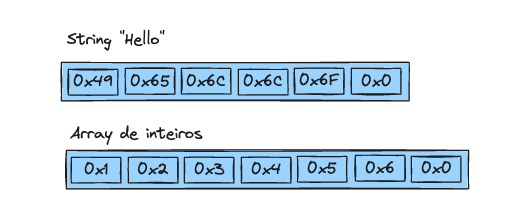
The simplest array possible
Below we have the implementation of a very simple array in asm, which we'll explore step by step in subsequent sections:
global _start

%define SYS_exit 60
%define EXIT_SUCCESS 0

section .data
array: db 1, 2, 3, 0

section .text
_start:
	mov al, [array]        ; array[0]
	mov bl, [array + 1]    ; array[1]
	mov cl, [array + 2]    ; array[2]
	mov sil, [array + 3]   ; array[3]
.exit:
	mov rdi, EXIT_SUCCESS
	mov rax, SYS_exit
	syscall
In the initialized data section .data, we declare an array with 3 elements of 1 byte each (integers from 1 to 3), using the number 0 as the array terminator:
section .data
array: db 1, 2, 3, 0
Next, in the .text section, which is where the program's source code goes, we can access array elements using pointer arithmetic, storing the result in registers:
section .text
_start:
mov al, [array]        ; array[0]
In the code above, we're accessing the value contained at memory address 0x402000 and storing the result in a register (AL) that has a size of 1 byte, meaning only the first byte of the array will be stored in the register.
Let's check with gdb:
# The array is stored at address 0x402000
# and contains the hex value 0x00 0x03 0x02 0x01,
# remembering that this architecture uses little-endian format
() &
()
()
()
# In register AL we have the first element of the array
()
# It's the same as accessing the first hexbyte contained at address
# 0x402000
()
Remember that the AL register represents the lower 8-bits within the spectrum of the RAX register which encompasses a total of 64-bits in the x86_64 architecture
To access the other array elements, just do pointer arithmetic and store in other 1-byte registers:
mov al, [array]        ; array[0] => 1
mov bl, [array + 1]    ; array[1] => 2
mov cl, [array + 2]    ; array[2] => 3
mov sil, [array + 3]   ; array[3] => 0 (array ends here)
Using an array with uninitialized data
So far, we're declaring the array in the .data section where data is initialized. But we can make the program more "dynamic" by declaring the array in the section of uninitialized data, which is .bss.
Keeping compatibility with the previous example, let's declare a 4-byte array using the resb directive which means "reserve byte", where the first 3 bytes are reserved to store array elements and the last byte representing 0x0 which is the array terminator.
section .bss
array: resb 4 ; 3 bytes + 1 terminator byte
In gdb, we can see that the array is initialized with all values at zero, indicating that the array is empty but has 4 bytes reserved:
() &
() &
To add elements to the array, we also need to use pointer arithmetic, just like we did in the previous example to access an array with pre-initialized data.
; Move value 1 to the first byte of the memory address at array
mov byte [array], 1  ; array[0] = 1
With gdb we confirm that at address 0x402000 where the array is, byte 1 was added:
() &
And if we want to add value 2 to the next byte of the array?
mov byte [array + 1], 2
() &
Notice that what changes is the array "index". At the initial position of the array, it's like the index is zero, and at the subsequent position, we use index 1, which can be incremented until the array terminator.
It would be very complicated to keep manipulating a hard-coded index. We need a pointer to represent this index.
Index to the rescue
Assuming the array pointer starts with zero, which is the memory address where the array is, we can declare it in the initialized data section .data:
section .bss
array: resb 4 ; 3 bytes + 1 terminator byte

section .data
pointer: db 0
So, we could add the first element like this, right?
mov byte [array + pointer], 1 ; array + 0
When running the program, we get this error:
src/live.asm:14: error: invalid effective address: multiple base segments
This error indicates that we're trying to do pointer manipulation from multiple memory segments, in this case array and pointer.
To solve this, we need to do pointer manipulation with immediate values (which was the previous case with hard-coded numbers) or with registers:
; append(1)
mov al, byte [pointer]
mov byte [array + rax], 1   ; array + 0
the first instruction moves the first byte contained at the
pointeraddress and stores it in register ALthe second instruction moves immediate value 1 (array element) to the array's memory address. Since RAX (64-bit version of AL) has value
0x0representing the pointer, we're inserting at the first byte of the array
And to store the second element in the array?
; append(2)
mov al, byte [pointer]
mov byte [array + rax], 2
In gdb, let's check what's happening:
() &
Uh, oh... This way we're overwriting the previous value. We actually want the pointer to "move", that is, it needs to be incremented by one byte so that append(2) results in 2 elements in the array.
With the INC instruction we can solve this problem:
mov al, byte [pointer]      ; pointer -> 0
mov byte [array + rax], 1   ; array + 0
inc byte [pointer]          ; pointer -> 1

mov al, byte [pointer]
mov byte [array + rax], 2   ; array + 1
() &
Yay! What a wonderful day!
Hitting the array limit
And if we keep incrementing the pointer until we hit the array limit?
mov al, byte [pointer]
mov byte [array + rax], 1   ; array + 0
inc byte [pointer]

mov al, byte [pointer]
mov byte [array + rax], 2   ; array + 1
inc byte [pointer]

mov al, byte [pointer]
mov byte [array + rax], 3   ; array + 2
inc byte [pointer]
# Reading the first 4 hexabytes of the array, we have the representation
# of the full array with all spaces occupied, remembering that
# the last byte is the array terminator
() &
# The pointer is at the end of the array
() &
Wonderful, and if we add one more element, should our program allow it?
mov al, byte [pointer]
mov byte [array + rax], 4   ; array + 3
inc byte [pointer]
# We shouldn't allow another element to be added,
# since our array was already full
() &
# The pointer is beyond the array capacity (not good...)
() &
Let's use a conditional jump (I explain more about this in the series) to not allow the element to be added. With this, before appending to the array, we should check if the pointer is already at the end of the array:
cmp byte [pointer], 3   ; check if array is full
je .exit                ; jump to .exit routine if flag is raised
Here's the complete program:
global _start

%define SYS_exit 60
%define EXIT_SUCCESS 0

section .bss
array: resb 4 ; 3 bytes + 1 terminator byte

section .data
pointer: db 0

section .text
_start:
	cmp byte [pointer], 3   ; check if array is full
	je .exit

	mov al, byte [pointer]
	mov byte [array + rax], 1   ; array + 0
	inc byte [pointer]

	cmp byte [pointer], 3   ; check if array is full
	je .exit

	mov al, byte [pointer]
	mov byte [array + rax], 2   ; array + 1
	inc byte [pointer]

	cmp byte [pointer], 3   ; check if array is full
	je .exit

	mov al, byte [pointer]
	mov byte [array + rax], 3   ; array + 2
	inc byte [pointer]

	cmp byte [pointer], 3   ; check if array is full
	je .exit

	; shouldn't allow adding the fourth element,
	; since the array supports up to 3 elements. this way,
	; we'd be writing to the memory address of other
	; program data
	mov al, byte [pointer]
	mov byte [array + rax], 4   ; array + 3
	inc byte [pointer]
.exit:
	mov rdi, EXIT_SUCCESS
	mov rax, SYS_exit
	syscall
() &
() &
Perfect, let's now do a small refactoring in the code separating the append logic into a subroutine:
global _start

%define SYS_exit 60
%define EXIT_SUCCESS 0
%define CAPACITY 3

section .bss
array: resb CAPACITY + 1

section .data
pointer: db 0

section .text
_start:
	mov rdi, 1
	call .append

	mov rdi, 2
	call .append

	mov rdi, 3
	call .append

	mov rdi, 4
	call .append
.exit:
	mov rdi, EXIT_SUCCESS
	mov rax, SYS_exit
	syscall
.append:
	cmp byte [pointer], CAPACITY ; check if array is full
	je .done

	mov al, byte [pointer]
	mov byte [array + rax], dil
	inc byte [pointer]
.done:
	ret
If you want to understand more about conditional jump, routines, call, ret and flags, I suggest reading my series which has been referenced several times in this article
Running with gdb and...
() &
() &
A big Yay!
However, there may be situations where we want our array to be resized to support more elements, that is, the array size would be dynamic.
How do we add more elements beyond the initial capacity without writing to other memory areas that don't belong to the array?
Heap, heap, hooray!
Before talking about the heap, let's remember how the memory layout of a computer program works:
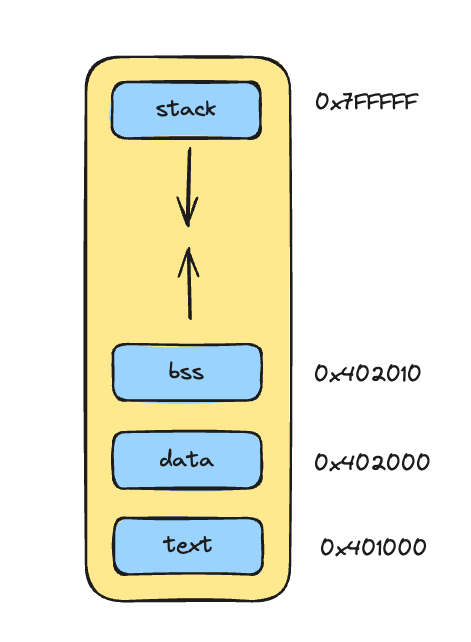
the layout is represented as an area in computer memory where we have the program's lowest memory addresses toward the highest addresses at the top
at the lowest memory addresses, we have the
.textsection, where we've already seen that it refers to the program itselfthen we have the data section which encompasses initialized data
.dataand the following section representing uninitialized data.bssat the highest addresses, we have the program's stack, which stores metadata such as the program name, its arguments and any program information that has a fixed size fitting within the stack, as well as function calls and their respective arguments
the stack has a stack format and "grows downward", that is, as we add elements to the stack, it grows toward lower addresses in memory
In the "middle" of the layout, between the data section and the stack, we have a large area in memory that many end up associating as heap. In the heap, we can allocate data dynamically, unlike the static way we do in the data section.
To accommodate a dynamic-sized array that supports resizing, we have to allocate memory in this area.
In this article, we'll call this region in the middle of memory between the data section and the stack heap
Dynamic memory allocation with brk
One way to manipulate this memory area is through the brk syscall, which changes the program break, which is where the data section ends.
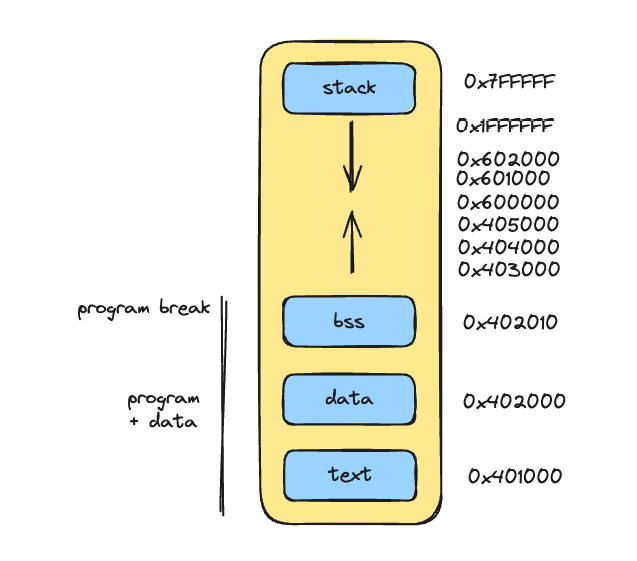
With brk, we can modify this program break to higher addresses, that is, allowing manipulation of memory areas that go beyond the program and data section.
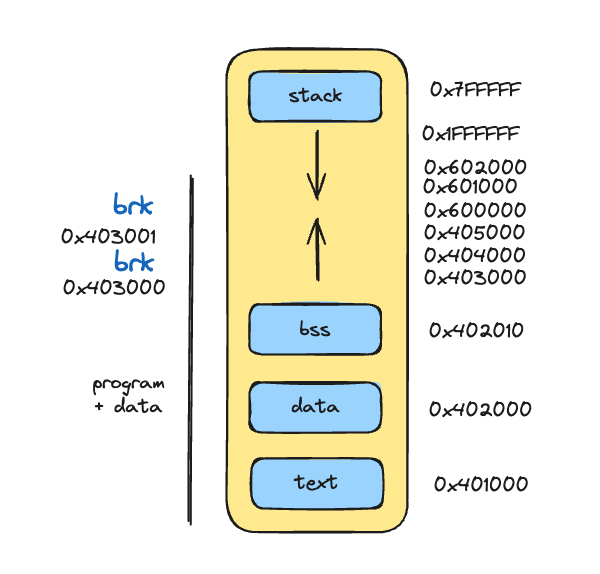
The first thing we need to do is map the syscall and make the call that brings the current break address:
%define SYS_brk 12
....

section .text
_start:
; syscall to access the program break (0x403000), which is where
; the data section ends and the heap begins
mov rdi, 0
mov rax, SYS_brk
syscall
....
With gdb, let's analyze the program state:
# Breakpoint at brk syscall line
()
()
# The program start is in the .text section and begins at
# 0x401000
()
# The pointer is in the .data section a bit higher and starts at
# 0x402000
() &
# The array is in the .bss section a bit higher and starts at
# 0x402004
() &
# Execute the brk syscall
()
# The brk syscall stores in RAX the program break memory address,
# in this case a bit higher at 0x403000
()
0x401000:.textsection which is where the program begins0x402000:.datasection where initialized data is0x402004:.bsssection where uninitialized data is0x403000: program break, which is where the data section ends and our "heap" begins
With this, from address 0x403000 onwards is where we'll put our array elements, so the array address can use just one byte, which points to the address where the first element begins in the heap.
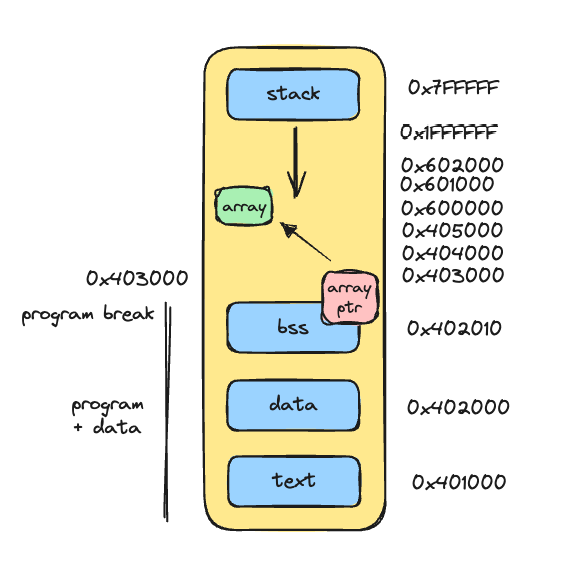
In the syscall we made, if the argument in RDI is zero, it means brk will return the current program break, in this case 0x403000. But we can make more brk syscalls with a different RDI argument (incremented), signaling that we're changing the program break.
From now on, in the .bss data section, we no longer need to reserve 4 bytes for the array, so only 1 byte is needed which will represent the array's memory address in the heap:
global _start

%define SYS_brk 12
%define SYS_exit 60
%define EXIT_SUCCESS 0
%define CAPACITY 3

; initially starts with 0x000000, but will later contain
; address 0x403000
section .bss
array: resb 1

section .data
pointer: db 0

section .text
_start:
	mov rdi, 0
	mov rax, SYS_brk
	syscall

	mov rdi, rax
	add rdi, CAPACITY
	mov rax, SYS_brk
	syscall

...
...
Analyzing with gdb:
# Breakpoint at first syscall
()
()
# Execute the syscall line
()
# In RAX the syscall stores the program break address, in this case
# 0x403000
()
()
At this moment, this address is not yet accessible because we haven't reserved new bytes in the heap. Let's move forward with the next syscall:
()
()
# Before executing the syscall, we verify that argument RDI will
# contain the desired address for the new program break, in this case with
# 3 bytes added, 0x403003
()
# Execute the syscall...
()
()
# After executing the second syscall, we see that in RAX, the program break was changed to 0x403003
()
Now, we can access memory addresses between 0x403000 and 0x403003:
()
()
()
()
Wow! Now we have in the heap a reserved area especially for our dear array, how cool is that!
How are we going to manipulate the array in this memory region?
Pointers, pointers everywhere
After the first syscall, we should take the memory address 0x403000 which represents the first program break and store it in the array pointer that's in .bss:
...
mov rdi, 0
mov rax, SYS_brk
syscall
mov [array], rax      ; <---- breakpoint here

mov rdi, rax
add rdi, CAPACITY
mov rax, SYS_brk
syscall
...
Let's check with gdb the breakpoint at the line that changes the array pointer:
()
()
() &
# Execute the line that changes the pointer
()
# Now the pointer points to address 0x403000,
# this is what we want
() &
Important to note that array is at address 0x402004, in the .bss section, so its value represents another memory address 0x403000 which is where the first array element should start in the heap.
Now, when we make the next syscall to allocate 3 bytes in the heap, the program break will be modified and we'll be able to manipulate the array since the pointer already points to the correct address.
After the second syscall, we can no longer manipulate array by its value, because now the array value is no longer an actual element, but rather an address to another place in memory.
Here's the program in its current version:
global _start

%define SYS_brk 12
%define SYS_exit 60
%define EXIT_SUCCESS 0
%define CAPACITY 3

section .bss
array: resb 1   ; 0x403000

section .data
pointer: db 0

section .text
_start:
	mov rdi, 0
	mov rax, SYS_brk
	syscall
	mov [array], rax

	mov rdi, rax
	add rdi, CAPACITY
	mov rax, SYS_brk
	syscall

	mov rbx, [array]

	mov r8, 1
	call .append

	mov r8, 2
	call .append

	mov r8, 3
	call .append

	mov r8, 4
	call .append
.exit:
	mov rdi, EXIT_SUCCESS
	mov rax, SYS_exit
	syscall
.append:
	cmp byte [pointer], CAPACITY ; check if array is full
	je .done

	mov sil, byte [pointer]
	mov byte [rbx + rsi], r8b
	inc byte [pointer]
.done:
	ret
Explaining each block:
mov rdi, 0
mov rax, SYS_brk
syscall
mov [array], rax
- fetches the current program break and stores the address in the
arraypointer
mov rdi, rax
add rdi, CAPACITY
mov rax, SYS_brk
syscall
- modifies the current program break, incrementing 3 bytes which is the initial array capacity in the heap
; assign to the register the memory address that the
; "array" pointer is pointing to
mov rbx, [array]
- stores the pointer's memory address in register RBX. This is necessary because we don't want to do arithmetic directly on the pointer in the
.bsssection, but rather through a register that allows it
mov r8, 1
call .append
- since now RDI was used as argument in the brk syscall, it's not convenient to use this register anymore to represent the element to be added to the array, so we switch to register R8
.append:
	cmp byte [pointer], CAPACITY ; check if array is full
	je .done

	mov sil, byte [pointer]
	mov byte [rbx + rsi], r8b    ; indirect-mode addressing
	inc byte [pointer]
.done:
	ret
Now the .append routine has been modified so that heap array manipulation is through register RBX. We also can't use register RAX anymore to represent the pointer because the brk syscall also used it as return for the program break; in this case we switch to RSI (which has SIL as its lower 8-bit representation).
Running with gdb, we can verify that elements are being added at address 0x403000 which is in the heap, through the pointer that was stored in register RBX:
# Array points to address 0x403000
() &
# At that address, we have the added elements. Yay!
()
# And the "index" pointer correctly representing the end of the array in the heap
() &
At this point, the program has the same behavior as the previous example with static array in .bss, not allowing adding more elements when the array reaches its limit.
Let's change this by resizing the array and allowing new elements to be added.
Resize with brk
Next, we start the steps so that array resizing is done when it reaches capacity limit. We start by changing the .append routine:
.append:
	cmp byte [pointer], CAPACITY ; check if array is full
	je .resize

	mov sil, byte [pointer]
	mov byte [rbx + rsi], r8b
	inc byte [pointer]
.done:
	ret
.resize:
	...
Instead of jumping to .done when the array is full, we jump to another subroutine called .resize, which should make the brk syscall again, thus modifying the program break in a new memory area, obeying the initial array capacity:
.append:
	cmp byte [pointer], CAPACITY ; check if array is full
	je .resize

	mov sil, byte [pointer]
	mov byte [rbx + rsi], r8b
	inc byte [pointer]
.done:
	ret
.resize:
	mov rdi, 0
	mov rax, SYS_brk
	syscall

	mov rdi, rax            ; RDI now represents the current break
	add rdi, CAPACITY       ; add 3 bytes, becoming 0x403006
	mov rax, SYS_brk
	syscall
	jmp .append
the first resize syscall brings the current break, in this case we already know it's
0x403003, which was allocated at the beginning of the program for the arraythe second resize syscall modifies the current break, thus allocating 3 more bytes in the heap
at the end of resize, instead of returning the function, we'll go back to the beginning of
.appendand execute the necessary logic to add the element to the array
This way, we can manipulate this new memory area to add more elements to the array, thus dynamically modifying its capacity.
If we run the program exactly like this, we'll face a problem, because:
every time resize is done, it jumps to the beginning of the routine
the array size (pointer) is checked against the initial capacity, which in this case is 3. Since the pointer reached value 3, it will enter resize again characterizing an infinite loop with infinite resize until memory runs out
To solve this, we need to compare the pointer with the current capacity (modified), and therefore we'll add a value in the .data section representing the current capacity:
%define CAPACITY 3

section .data
pointer: db 0
currentCapacity: db CAPACITY ; starts with 3
In the .append routine, we'll make the comparison with currentCapacity, which will be modified with each resize, instead of with CAPACITY, which will remain fixed with the initial value throughout the program.
.append:
	mov r9, [currentCapacity]
	cmp byte [pointer], r9b     ; check if array is full
	je .resize
...
And, after resizing before going back to .append, we'll increment the initial capacity to the current capacity:
.resize:
	mov rdi, 0
	mov rax, SYS_brk
	syscall

	mov rdi, rax
	add rdi, CAPACITY
	mov rax, SYS_brk
	syscall

	mov r10, currentCapacity
	add byte [r10], CAPACITY
	jmp .append
Running the program, we can see that element 4 was successfully added to the array after resizing:
()
And if we add more and more elements?
...
	mov r8, 4
	call .append

	mov r8, 5
	call .append

	mov r8, 6
	call .append

	mov r8, 7
	call .append
...
# We can see that currentCapacity is 9, meaning there were
# 2 resizes. Our array can now accommodate up to 9 elements,
# so when adding the tenth element, one more resize would be done.
() &
# Fetching the first 9 hexabytes at the array address in the heap
()
How cool is that?
The final program
Here's the final program, with an array of initial capacity of 3 elements in the heap that can be resized using the brk syscall, as more elements are added to the array:
global _start

%define SYS_brk 12
%define SYS_exit 60
%define EXIT_SUCCESS 0
%define CAPACITY 3

section .bss
array: resb 1

section .data
pointer: db 0
currentCapacity: db CAPACITY ; initial capacity is 3

section .text
_start:
	mov rdi, 0
	mov rax, SYS_brk
	syscall
	mov [array], rax

	mov rdi, rax
	add rdi, CAPACITY
	mov rax, SYS_brk
	syscall

	mov rbx, [array]

	mov r8, 1
	call .append

	mov r8, 2
	call .append

	mov r8, 3
	call .append

	mov r8, 4
	call .append

	mov r8, 5
	call .append

	mov r8, 6
	call .append

	mov r8, 7
	call .append
.exit:
	mov rdi, EXIT_SUCCESS
	mov rax, SYS_exit
	syscall
.append:
	mov r9, [currentCapacity]
	cmp byte [pointer], r9b ; check if array is full
	je .resize

	mov sil, byte [pointer]
	mov byte [rbx + rsi], r8b
	inc byte [pointer]
.done:
	ret
.resize:
	mov rdi, 0
	mov rax, SYS_brk
	syscall

	mov rdi, rax
	add rdi, CAPACITY
	mov rax, SYS_brk
	syscall

	mov r10, currentCapacity
	add byte [r10], CAPACITY
	jmp .append
Conclusion
In this article, we showed the implementation of an array in x86 Assembly, covering important concepts like memory layout, register manipulation, and dynamic memory allocation with brk.
This article is the foundation for future articles about data structures, where I intend to write about implementing queues and later other data structures.