A comprehensive introduction to Ruby
Another tutorial for learning Ruby? Absolutely not. This guide is different from the typical tutorials you'll find online.
As someone new to Ruby, you've likely already completed a few tutorials. Instead of providing yet another tutorial, this guide aims to offer unique insights and valuable resources to help you further your understanding of Ruby.
🤔 But I've never completed any tutorial in Ruby
Even if you haven't completed any tutorials, this guide is designed to help you from the very beginning. By focusing on understanding the fundamentals, you'll be able to practice with greater confidence and build a solid foundation in Ruby.
Index
In this article, we'll cover the following topics:
An overview of how Ruby is implemented
A brief history of Ruby
A short discussion of some of the key features of Ruby
A simple "Hello, world" example in Ruby
An introduction to IRB (Interactive Ruby)
A short look at the data types in Ruby
An exploration of why everything in Ruby is an object
🖖 First things first
Ruby is a versatile general-purpose language that can be used across various domains, from web development to IoT.
However, it has gained significant adoption in the web development industry, particularly in the startup scene since the mid-2000s.
It can be downloaded in several ways, including using a Docker image for those who prefer using Docker.
💎 How is Ruby implemented
If you downloaded Ruby from the official website or used the default Docker image, you likely have the standard Ruby implementation: CRuby, which is primarily written in C.
Although there are several implementations of Ruby, such as JRuby and Rubinius, CRuby is the most commonly used among major companies such as Shopify and Github.
⌛ A time travel to the Ruby's history
Ruby was created in the early 1990s by Yukiriro Matsumoto, or "Matz", a programmer and computer scientist in Japan.
🟢 1993, where it all started
Matz started the Ruby implementation in 1993, drawing inspiration from existing languages like Perl and Smalltalk. His implementation was called CRuby, or "MRI" (Matz Ruby Interpreter).
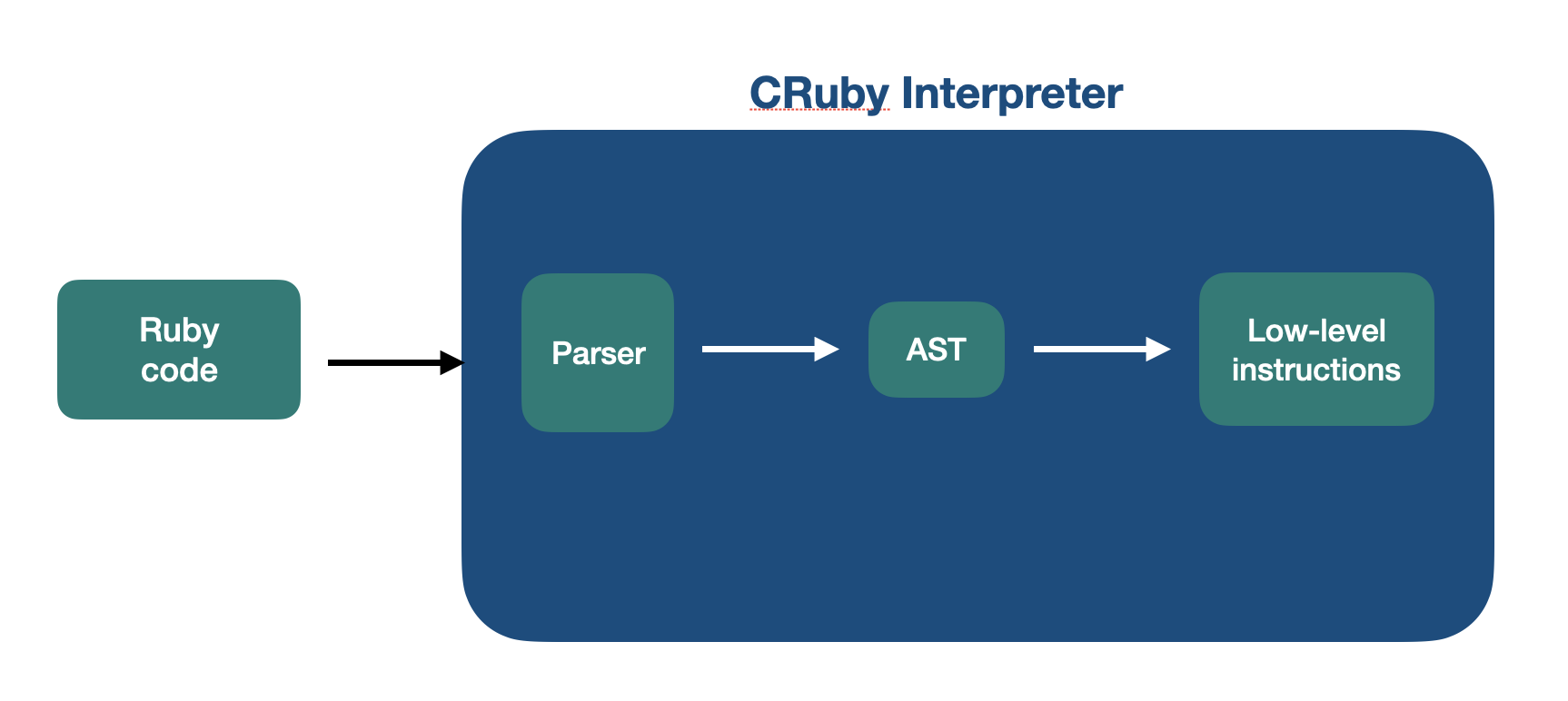
👉 Ruby is interpreted CRuby is an interpreter, meaning that the source code is not compiled into optimized code; instead, it is interpreted line-by-line and translated to low-level instructions during execution.
🟢 1995-2000, big in Japan
Ruby was first released publicly in 1995, and until 1999, several features and improvements were added to the standard library. However, its adoption remained limited to Japan.
In 2000, Dave Thomas and Andy Hunt published the first English-book on Ruby, "Programming Ruby" (a.k.a The Pickaxe Book), which played a crucial role in popularizing Ruby outside of Japan.
🟢 2004, Ruby on Rails
Ruby on Rails, a web application framework built with Ruby, was released by David Heinemeier Hansson (a.k.a DHH). This framework played a significant role in Ruby's widespread adoption in the web development community.
🟢 2007, meet YARV
CRuby was known to have various performance problems due to its interpretation process, lacking a compilation process such as JIT (Just-in-time compilation).
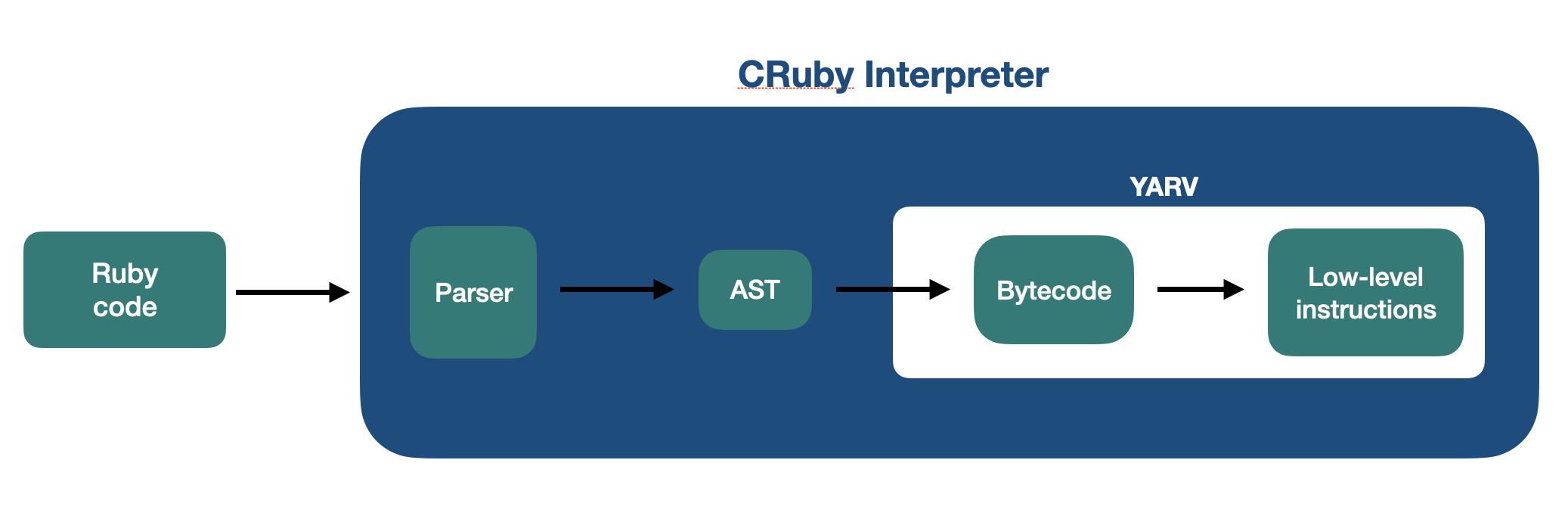
During the development of version 1.9, the Ruby core team decided to refactor a significant portion of the CRuby source code. This resulted in the creation of the Ruby VM, which was integrated into the CRuby interpreter.
The new VM, called YARV (Yet Another Ruby VM, duhh :P), takes the parsed tree (AST) and generates a bytecode instead of low-level instructions, enabling optimizations to be made. This bytecode is then translated into optimized low-level instructions, resulting in improved performance.
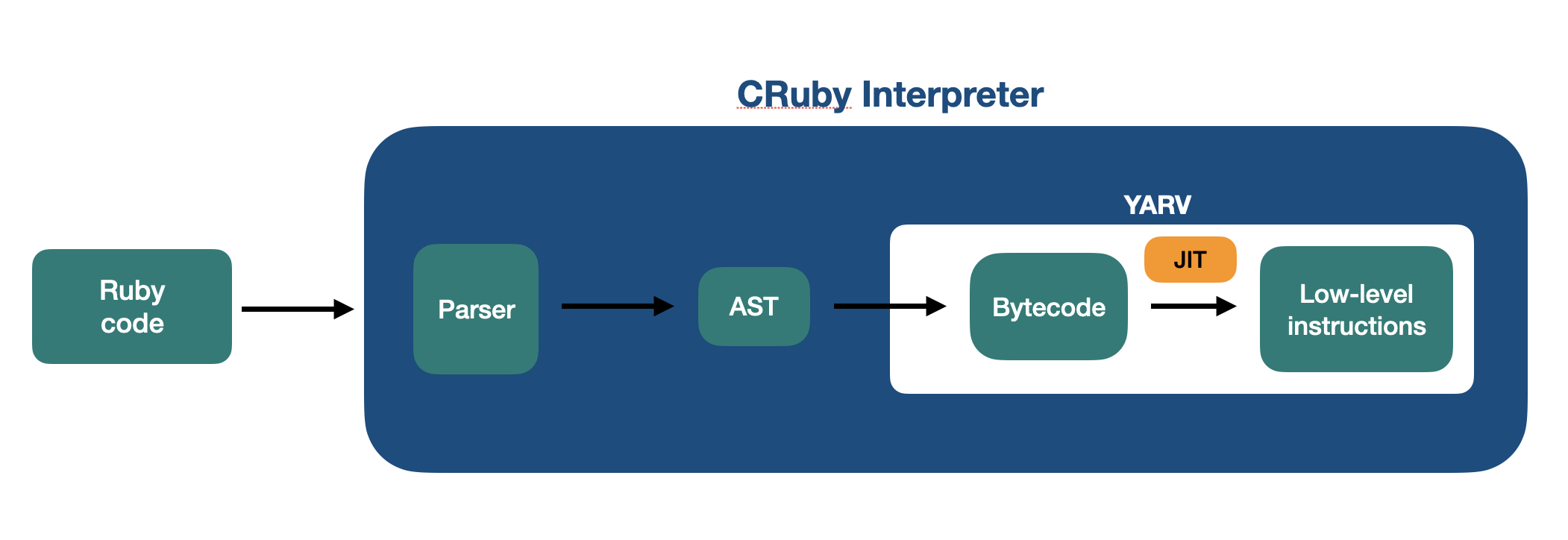
Later, in the version 2.6, a new JIT was introduced, called MJIT. This uses a separate thread to perform optimizations on a portion of Ruby code, which are then joined during the execution process.
🟢 2021, the Ruby 3.0
After years of continuous improvement, Ruby 3.0 was realeased in 2021, introducing new features to address the lack of concurrency, parallelism, and async I/O.
Ractors were introduced to enable parallelism on CPU, while Fibers brought a new scheduler interface that enables cooperative scheduling. When used with non-blocking I/O, this allows for faster Ruby applications that are heavily I/O bound.
🟢 YJIT, a new hope
The Ruby core team is currently developing a new version of Ruby that includes a faster JIT compiler called YJIT. This new JIT is expected to be faster than the current MJIT, providing significant performance improvements for Ruby applications.
💎 Ruby key features
Ruby is a high-level programming language that uses an interpreter to translate Ruby code into low-level code.
Some of the key features of Ruby include:
👉 Dynamic types Ruby is a dynamically typed language, which means that variable types are determined at runtime.
👉 Object oriented Not only Ruby supports OOP, everything in Ruby is an object, including primitive data types like numbers and strings. By using dynamic dispatch, Ruby combines data and behaviour for almost everything in a Ruby program.
👉 Mixins Ruby uses mixins instead of multiple inheritance, which allows for modular and reusable code. Mixins are achieved through the use of modules, which can be included in classes to provide additional functionality.
👉 Garbage collected Ruby brings automatic memory management, taking care of allocating and freeing memory of objects as needed. This process is called Garbage Collection, or GC.
👉 Metaprogramming Ruby allows for metaprogramming, which means that you can write code that generates or modifies other code at runtime. This feature enables expressive and flexible programming techniques like domain-specific languages (DSLs).
👉 Functional programming Although Ruby is not a purely functional language, it supports functional programming concepts like high-order functions and immutable data structures. It also includes functional constructs like blocks, procs and lambdas, which enable the creation of expressive and concise code.
💎 Hello, world
Every programming language deserves a "Hello, world" example, and Ruby is no exception. Here's the simplest "Hello, world" program you can write in Ruby:
rubyis the CRuby interpreter that takes an input in the form of Ruby source codethe
-eoption allows Ruby code to be passed directly to the command line instead of from a source fileprintis a method in Ruby that outputs arbitrary text to STDOUTthe message is finished with a
\ncharacter, which ensures the output is properly formatted and doesn't overlap the next line in the shell
Alternatively, Ruby provides a method called puts that automatically appends a \n character to the given text:
💎 IRB
Ruby's interactive shell, known as IRB (Interactive Ruby), provides a convenient way to experiment with Ruby code and test small code snippets without needing to write and execute a full program.
Now, in IRB:
1 + 1
=> 2
💎 Data Types
Ruby includes data types commonly used in mainstream technologies:
+------------+------------------------------+
| Data Type  | Examples                     |
+------------+------------------------------+
| Integer    | 42, -10, 0                   |
| Float      | 3.14, -1.23e-4               |
| Boolean    | true, false                  |
| String     | "Hello, world!", 'Ruby'      |
| Array      | [1, 2, 3],                   |
|            | ['apple', 'banana', 'cherry']|
| Hash       | {name: 'Alice', age: 25}     |
| Symbol     | :name, :age, :status         |
| Nil        | nil                          |
+------------+------------------------------+
👉 Ruby is dynamically typed As mentioned earlier, Ruby is a dynamically-typed language, meaning that variable types are determined at runtime.
name = "Leandro"
age = 18
It's worth noting that Ruby doesn't require variable type specifications.
Instead, the interpreter dynamically infers the value's data type at runtime, allowing programs to execute successfully without explicit type declarations.
We can confirm this behavior by calling the class method on variables:
name.class
=> String

age.class
=> Integer
But how it's possible to call methods from primitive data types in Ruby?
💎 Everything in Ruby is an object
Since everything in Ruby is an object, even primitive data types such as strings and integers can have instance methods called on them.
This makes Ruby a highly object-oriented language, where every piece of data is represented as an object with its own state and behavior.
name.object_id
=> 80

age.object_id
=> 37

1.class
=> Integer

1.object_id
=> 3
Before we dive deeper into object-oriented programming in Ruby, it's important to understand what an object is and how it works in the context of the language.
🔵 OOP
Alan Kay, one of the pioneers of object-oriented programming (OOP), defined an object as a unit of software that encapsulates data and behavior.
This definition means that an object combines data (state) and the code that manipulates that data (behavior), resulting in a more modular and organized approach to programming.
🔵 OOP in Ruby
To create objects in Ruby, we need to define a template that can generate multiple objects. In Ruby, this template is defined using the class keyword:
end
Objects in Ruby, also called instances, can be created by calling the method new in the class:
Account.new # an instance of the Account class
Account.new # another instance
Account.new # yet another instance
...
We can confirm that an instance object represents the Account class and holds an object ID by calling the instance methods class and object_id:
account = Account.new

account.class
=> Account

account.object_id
=> 60
👉 Classes are objects too Remember, everything in Ruby is an object. Classes are no different.
Classes are just instances created from the class Class:
Account.class
=> Class

Account.object_id
=> 80
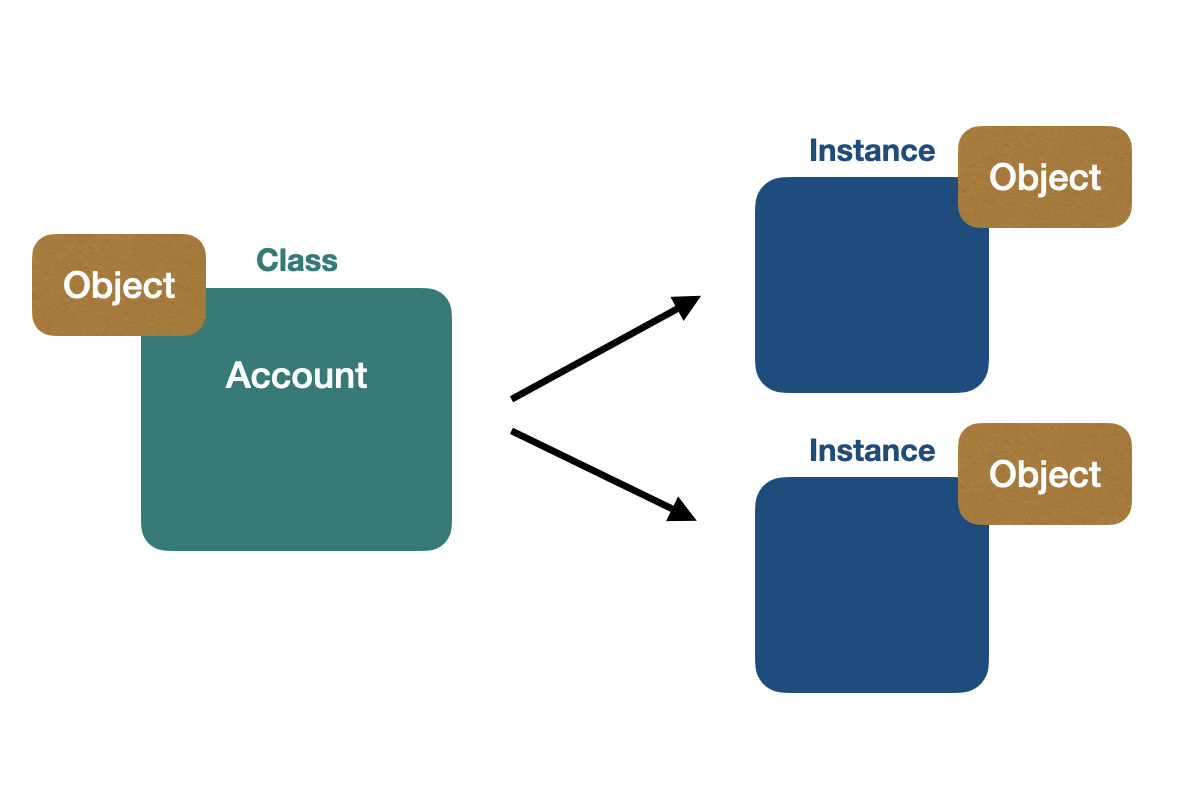
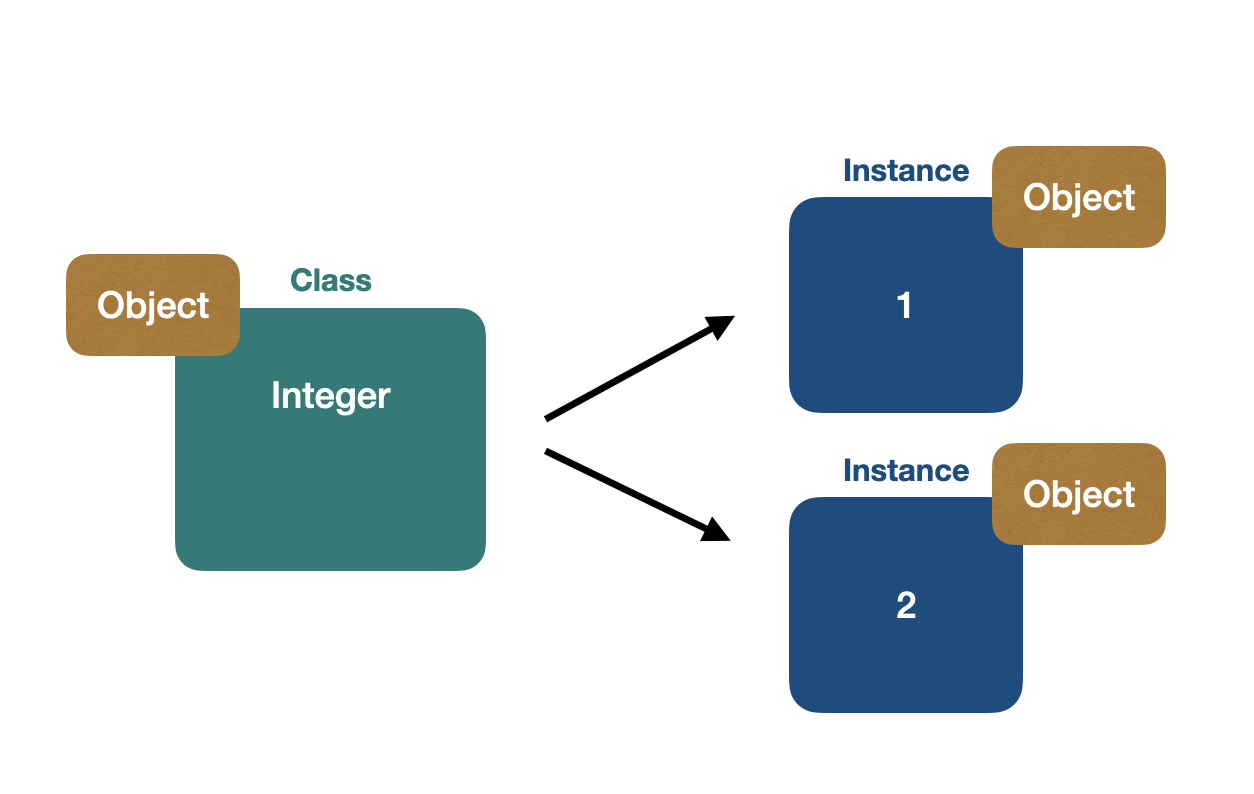
👉 Also, Integers are objects We can represent the integers as instances from the Integer class, since Integer is an instance of the Class class:
👉 Single inheritance
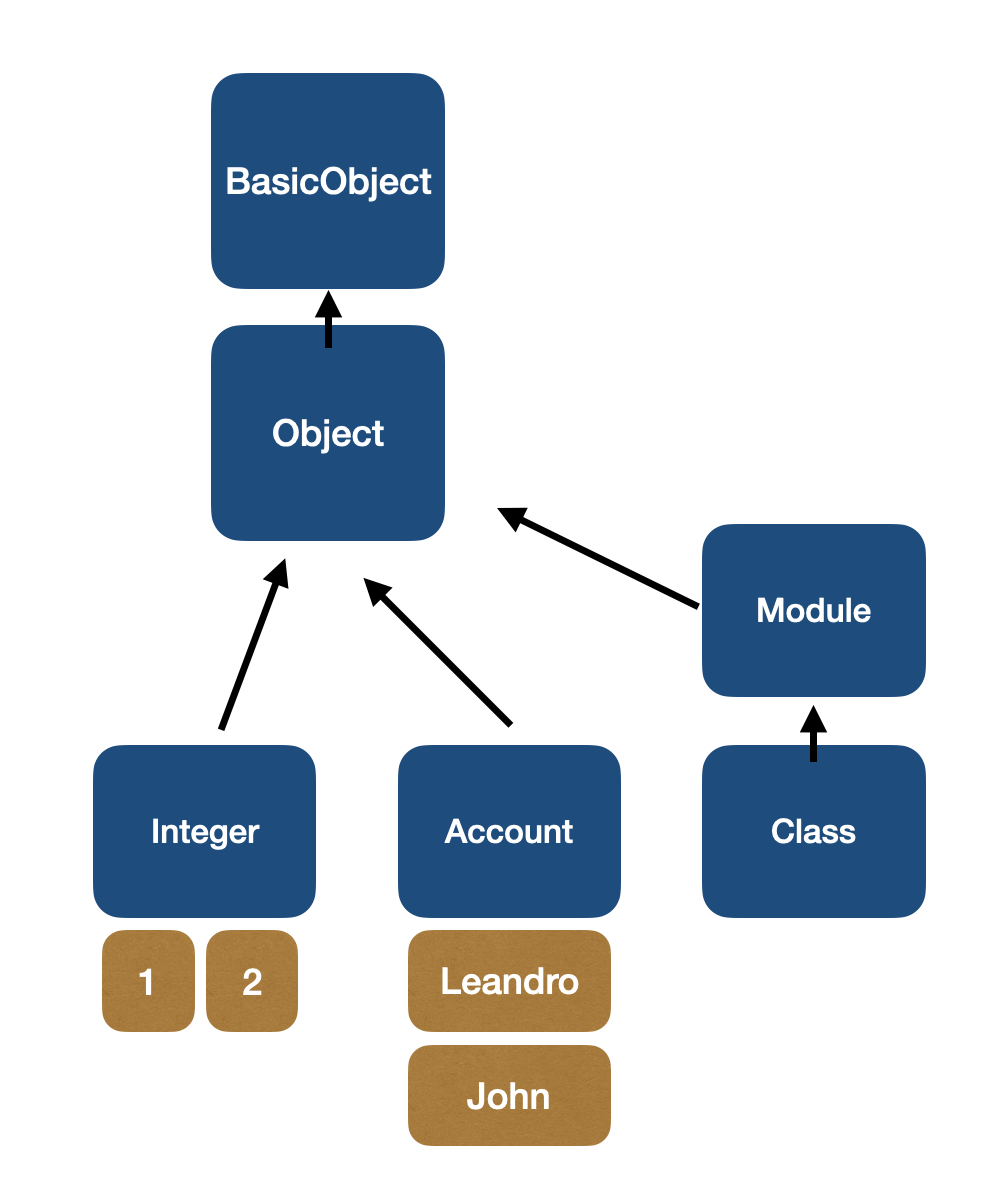
Ruby uses single inheritance, which means that every class inherits from a single superclass. It's worth noting that every class in Ruby will inherit from the BasicObject parent class in some way.
We can verify this behavior in Ruby by examining class hierarchies:
Account.new.class     # Account
Account.class         # Class
Account.superclass    # Object

1.class               # Integer
Integer.class         # Class
Integer.superclass    # Numeric
Numeric.superclass    # Object

Class.superclass      # Module
Module.superclass     # Object

Object.superclass      # BasicObject
BasicObject.superclass # nil
Based on the example above, here's a portion of the Ruby class hierarchy:
🔵 Modeling OOP in Ruby
In Ruby, everything is an object, which means that instances can hold state (attributes) and behavior (methods).
In our current implementation, the Account class has no visible state or behavior, as it inherits all of its attributes and methods from the Object class. However, let's say we want every Account instance to have a starting balance of zero.
Let's see the solution.
👉 The initialize method Ruby provides a special method called initialize, which is automatically called every time a new instance is created (i.e., when Account.new is called).
By default, initialize is empty, so there's no need to define it. However, since we want to modify the initialization of the object, we should override the initialize method:
@amount = 0
end
end
leandro = Account.new
john = Account.new
You might be wondering about the @ character that appears before the variable name in our example. In Ruby, variables inside methods are typically treated as local variables by default:
name = "Leandro"
end
It's important to note that local variables within methods are discarded by the interpreter when the method is finished.
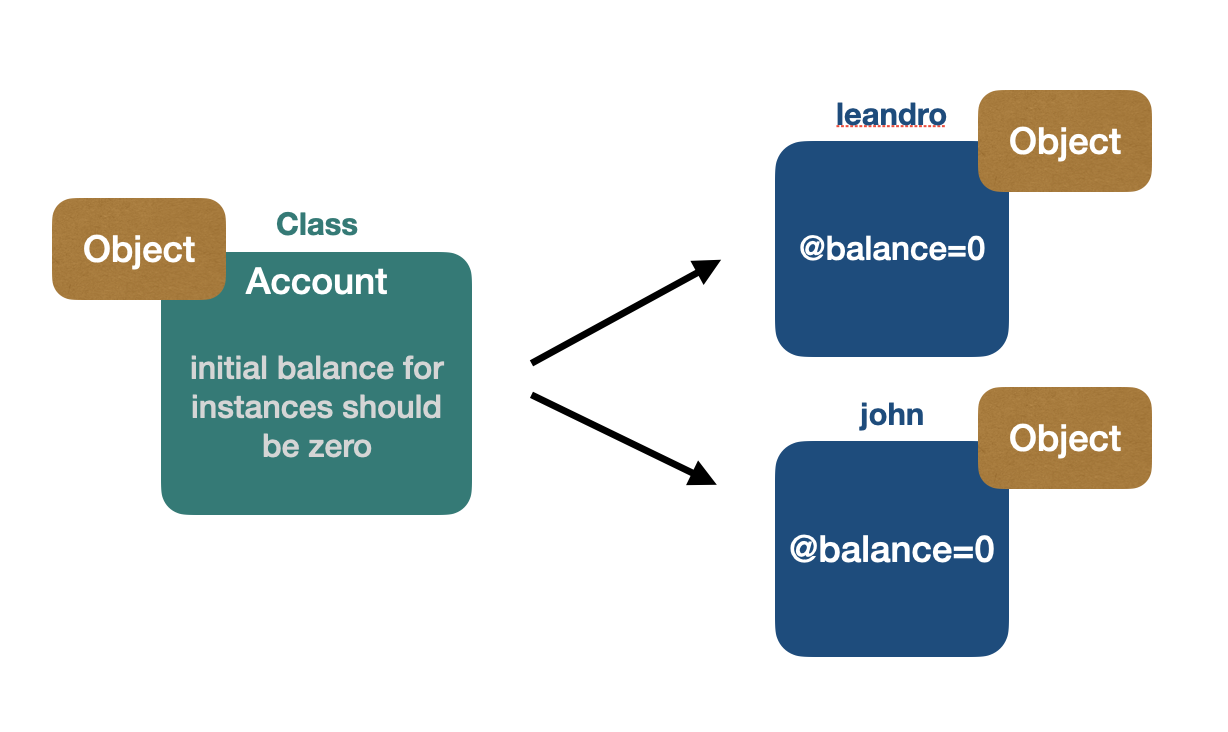
To store variables that should persist during the lifetime of an object (i.e., its state), we should use instance variables instead. In Ruby, instance variables are denoted by the @ symbol.
Here's a visual representation of instance variables:
👉 Objects in Ruby are encapsulated In Ruby, an instance's state is private by default, which means that we cannot directly access an object's state from outside the object. Instead, we can use instance methods to retrieve or modify the object's state.
To demonstrate this, we can create an instance method called balance, which will return the current balance of the account object:
@balance = 0
end
@balance
end
end
With the balance method defined, we can now retrieve the current balance of our account instance:
leandro = Account.new

leandro.balance
=> 0
It's true that state without manipulation is often useless. To make our Account class more practical, we can define another instance method that will modify the balance:
@balance = 0
end
@balance
end
@balance = balance
end
end
leandro = Account.new
leandro.set_balance(10)
leandro.balance
=> 10
In the set_balance method, it's important to understand the difference between balance and @balance:
balanceis a local variable that exists only during the lifetime of the method execution.@balanceis an instance variable that persists during the lifetime of the instance object.
👉 Syntactic sugar all the way Now, suppose we want to modify the balance using a setter method. In Ruby, we can define setter methods by appending an = sign to the method name, like so: balance=(balance):
...
@balance
end
@balance = balance
end
end
leandro = Account.new
leandro.balance=(10)
leandro.balance
=> 10
Ruby is a language that values simplicity and readability, and it makes use of syntactic sugar to achieve this. One example of this is the ability to omit parentheses when calling methods:
leandro.balance=(10)

# becomes

leandro.balance= 10
In fact, Ruby goes even further in its quest for readability and simplicity. When calling a method with a suffix of =, we can omit the parentheses and instead add a blank space before the = sign:
leandro.balance= 10

# becomes

leandro.balance = 10
Pretty cool, isn't it? With this syntax, we can make method calls that look like variable assignments!
@balance = 0
end
@balance
end
@balance = balance
end
end
👉 attr_reader/writer/accessor One of the great things about Ruby is that it provides built-in class methods like attr_reader that can help make our code more concise and readable.
In particular, attr_reader works like a getter method for instance variables, allowing us to access their values from outside the class:
@balance
end
# becomes
attr_reader :balance
In addition to attr_reader, Ruby also provides attr_writer, which works like a setter method for instance variables:
@balance
end
# becomes
attr_writer :balance
Together, these two methods can help make our code more concise and easier to read, enabling us to quickly define and manipulate instance variables with ease:
attr_reader :balance
attr_writer :balance
@balance = 0
end
end
To further simplify the code, we can use attr_accessor when we have both a attr_reader and attr_writer method for the same instance variable:
attr_accessor :balance
@balance = 0
end
end
leandro = Account.new
leandro.balance = 10
leandro.balance
=> 10
Ruby truly does make programming a joy!
Wrapping Up
In this post, we provided a comprehensive introduction to the Ruby programming language.
We covered a wide range of topics, from the implementation of Ruby and its history to its key features and data types.
Finally, we explored the key concept that everything in Ruby is an object, giving you a solid foundation for understanding the language's core principles.
In future posts, we will continue to explore the key features of Ruby, including scopes, the self context, blocks, lambdas, and much more.
By delving deeper into these topics, I hope to provide you with a comprehensive understanding of Ruby that will enable you to write powerful, effective code with ease.
Stay tuned!
References
Ruby official websiteWikipedia - Ruby programming languageWikipedia - InterpreterMJIT: a method based JIT compiler for RubyRuby implementationsYJIT - building a new JIT compiler for CRubyYJIT - a basic block versioning JIT compiler for CRubyRuby 3.0 release notes
This post was written with the assistance of ChatGPT, which helped to compile information and identify grammar errors and inconsistencies.